

Teaming
The right partner can open doors to work you couldn’t win on your own. GovTribe gives you two ways to find one: connect with contractors in our teaming network, or research partners yourself with GovTribe data.
In this guide, we’ll walk through both, from posting your first teaming interest to vetting partners the old-fashioned way.
Jump to a section
Two ways to team
Which approach is right for you?
You can use both. The teaming network is the easiest way to find contractors who are already looking for partners. Researching partners yourself helps when you have a specific need in mind.
Teaming network Connect inside GovTribe Find primes and subs who want to team on the same federal opportunity, then message them and build your team, right in GovTribe. Explore the teaming network → Research Find partners yourself Use vendor profiles, award history, and contacts to find and vet partners with the experience you need, then reach out directly. Explore partner research →
01 / Teaming network
Join the GovTribe teaming network
Our community of contractors also doubles as a teaming network, right inside GovTribe. You can stay anonymous until you’re ready to share who you are.
Start by setting up your capture profile
Your capture profile tells GovTribe which company you team as and whether you usually prime or sub. GovTribe uses it to recommend partners and fill in your teaming interests for you.
How: Open your profile menu, select View Profile, then scroll to Capture Profiles to add or update yours.
See who wants to team
Check any supported federal record to see how many vendors are open to teaming on it.
Get matched
GovTribe recommends good-fit primes and subs based on your capture profile.
Build your team
Message partners, share files, and lock in your team without leaving GovTribe.
Where you can team
Federal contract opportunities Federal contract IDVs Federal contract vehicles Federal forecasts Federal contract awards
Teaming on a forecast or award lets you line up partners early, before a solicitation is released or ahead of a recompete.
Looking for ideas? The Teaming Explore feed shows vendors already looking to team and opportunities that match your capture profile. You’ll also get recommended teaming partners by email each week.
02 / Post an interest
Post a teaming interest
A teaming interest tells other contractors you’re looking for partners on a specific record, and lets GovTribe match you with the right primes or subs.
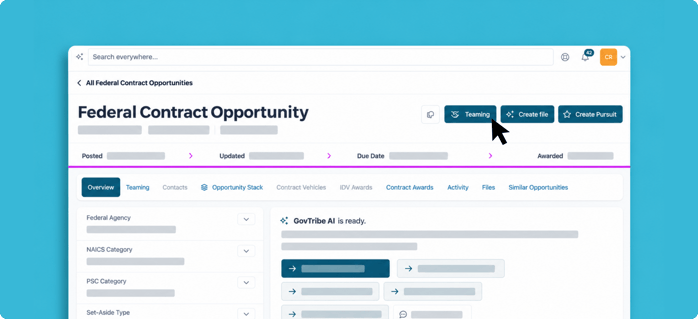
On a federal opportunity, select Teaming to view or post teaming interests.
1
Open the record you want to team on, then select Teaming → Post your interest.
2
Choose Find Subcontractors if you plan to lead the bid, or Be a Subcontractor if you want to join someone else’s team.
3
Confirm the company you’re teaming as, then answer a few short questions about your goals and experience. GovTribe AI suggests ways to sharpen your answers as you go.
4
Save your interest. GovTribe writes an anonymous public profile for you, and other vendors can start sending you requests.
You stay anonymous until you accept. Other vendors see your anonymous profile, not your company name. Your name and logo are only shared once a teaming request is accepted.
03 / Build your team
Connect and build your team
Once your interest is live, GovTribe matches you with vendors on the opposite side, so primes see subs and subs see primes.
1
Send or receive a request. Either side can send a teaming request, and new requests show up in your conversations and notifications.
2
Start talking right away. A conversation opens as soon as a request is sent, so you can ask questions before you decide.
3
Accept to share who you are. When a request is accepted, both companies see each other’s name and logo, and the conversation continues.
4
Lock in your team. When you’ve found the right partners, lock in your team. You can also withdraw or disband if plans change.
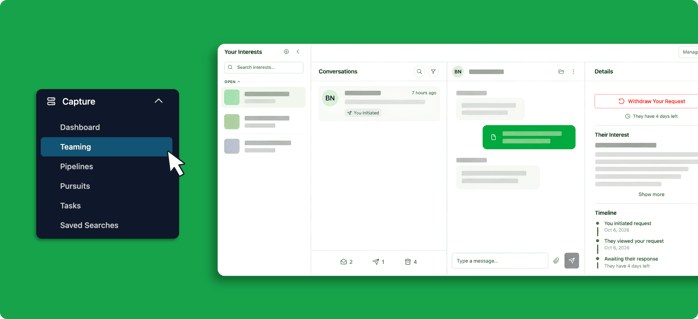
In the Teaming tab, manage your interests and requests, and chat with potential partners.
04 / Research partners
Find partners the old-fashioned way
Sometimes you need a partner with a very specific profile, like a mentor for a mentor-protégé program or a sub with experience at one agency. GovTribe data helps you find and vet them yourself.
How to research a partner
✓
Find who’s active. Search awards by NAICS or PSC code to see which companies are winning work in your space.
✓
Vet their profile. Check vendor profiles for certifications, identifiers, and award history.
✓
Check their buyers. See which agencies they win with, and whether those agencies match your targets.
✓
Time your outreach. Look for contracts ending soon, then work backward to line up partners before the recompete.
✓
Find the right person. Use Beacon to find contacts at the company and reach out.
You can also ask GovTribe AI to do the legwork, like “Find small businesses with recent awards from this agency that could sub on this opportunity.”
Make it easy for partners to find you, too. Other contractors research partners the same way, so claim your company’s vendor profile and keep your information and contact details up to date.
How: Search for your company in GovTribe, open its vendor profile, and select Claim this Vendor.
See it in action
Customer story · PORTCO How PORTCO found 11 teaming partners PORTCO used GovTribe to find the right opportunities, vet potential mentors, and time its outreach around expiring contracts. The result: 11 mentor-protégé agreements that are creating jobs for disabled veterans. Read the story →“They had the work, we had the workforce. It was like bringing together chocolate and peanut butter.”
Ralph Wahlberg, SEVP of Business Development, PORTCO
A few tips before you dive in
✓
Start early. Post interests on forecasts and expiring awards so you have time to build the right team.
✓
Be specific. Clear answers about your capabilities and goals help GovTribe write a stronger public profile and help partners decide faster.
✓
Do your homework. Once names are shared, check your partner’s vendor profile and award history before you lock in your team.
Questions?
Chat with our AI user guide for quick answers, or explore more guides to get the most out of GovTribe.
Chatting with our AI user guide is free and does not use any credits.