

BID DECISIONS
Finding a promising opportunity is one thing. Deciding whether to pursue it is another. You need to understand the requirements, competition, pricing, and how well the work fits your business.
GovTribe can help you work through those questions with AI-powered research and recommendations. And when you need a second opinion, you can connect with experts who know the market. Here's how to use both to make a more informed bid decision.
Jump to a section
01 / BID/NO-BID REVIEW
Start with a bid/no-bid review
Before committing time and resources to an opportunity, ask GovTribe AI to help you evaluate it. AI can review the requirements, buyer history, competition, timing, and your company's fit to help you decide whether to pursue, partner, watch, or pass.
The more context you provide about your capabilities, past performance, and priorities, the more useful the review can be.
How to get started
1
Choose an opportunity. Open one you're interested in from Opportunities or a pursuit you're already tracking in Capture.
2
Open GovTribe AI. Use the AI option on the record when available, or open GovTribe AI → New Chat and share the opportunity link.
3
Ask for a bid/no-bid review. Include your company's capabilities and any requirements that matter to you. Ask AI to explain its recommendation and highlight anything you still need to verify.
TRY THIS PROMPT
"Run a bid/no-bid review for this opportunity based on our company's capabilities and past performance. Consider eligibility, competition, timing, and potential partners. Recommend pursue, partner, watch, or pass, and explain why."
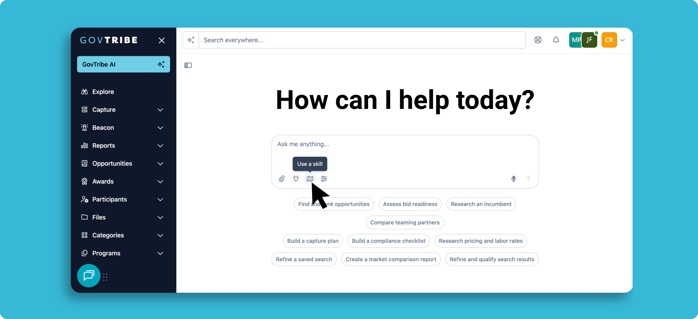
GovTribe AI → Use a skill
Tip: You can also choose Use a skill in GovTribe AI and select Capture Workflows for a more structured review.
GovTribe AI reviews use credits. See our guide to GovTribe credits for details on usage and managing your balance.
02 / DEEPER RESEARCH
Dig deeper into the important questions
A bid/no-bid review is a starting point. GovTribe AI can also help you dig into specific questions that might change your decision, from who you're competing against to whether your past work supports the requirements.
Incumbent research
Find out who has the work now, what came before, and what that might mean for your approach.
Ask AI who holds the current contract.
Past-performance checks
Compare your past projects to the requirements. See where your experience is strong and where you may need a partner.
Ask AI to identify matches and gaps.
Black-hat reviews
Look at the opportunity from a competitor's perspective. Compare likely strengths, weaknesses, and ways to improve your positioning.
Ask AI to review likely competitors.
Price-to-win analysis
Use past awards, competitor signals, and pricing assumptions to explore a competitive price range.
Ask AI to assess the pricing landscape.
Make the research more useful
Give GovTribe AI your opportunity link, relevant company experience, and any supporting documents. Ask it to separate confirmed information from assumptions and point out questions your team still needs to answer.
03 / EXPERT ADVICE
Get another perspective from an expert
Sometimes you need more than research. You want to talk to someone who understands the buyer, program, competition, or contracting process.
That's where OnFrontiers comes in. GovTribe recommends relevant experts directly on supported federal opportunities and pursuits, so you can find someone with useful experience without starting your search from scratch.
What kind of help can you find?
Customer & program insight
Better understand the agency's mission, program needs, and operating environment.
Contracting & acquisition
Get perspective on contract vehicles, acquisition strategy, and requirements.
Competition & capture
Pressure-test your approach, positioning, teaming, and competitive strategy.
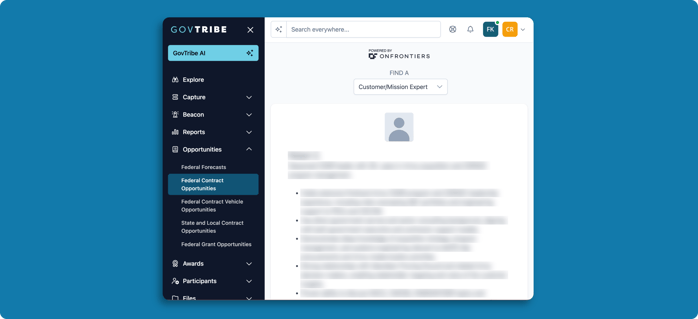
Scroll to the bottom of a federal opportunity to see recommended OnFrontiers experts
How to connect with an expert
1
Open a federal opportunity or pursuit. Look for OnFrontiers recommendations near the bottom of a supported federal opportunity, or open the OnFrontiers tab in a pursuit.
2
Review your matches. Choose the kind of expertise you need and review the recommended profiles to find someone who can help answer your questions.
3
Select Connect. GovTribe will open the expert's OnFrontiers profile, where you can arrange a consultation or another engagement.
How does pricing work?
GovTribe helps you find relevant experts, but consultations are arranged and paid for through OnFrontiers. OnFrontiers has its own pricing and credits, separate from your GovTribe AI credits. You can review the engagement details and cost before booking.
Tip: Go into an expert conversation with a few specific questions. It's a chance to validate assumptions, understand risks, and get perspective on a pursuit you're seriously considering.
04 / NEXT STEPS
Turn your research into a decision
Once you've reviewed the opportunity, explored the competitive landscape, and gotten any outside advice you need, bring it all together.
Pursue
The work fits your business, and your team is ready to move forward.
Partner
There's an opportunity, but you may need another company's capabilities or experience.
Watch
It's worth monitoring, but there are still questions to answer before committing.
Pass
The fit or timing isn't right, so you can focus your team's efforts elsewhere.
Keep the next steps in GovTribe
If you're moving forward or keeping an opportunity under consideration, select Create Pursuit on the opportunity to bring it into your Capture pipeline. Add notes, assign an owner, and create tasks to keep your team moving.
Keep in mind: GovTribe AI and expert advice can help you make a better-informed decision, but your team should make the final call based on verified requirements, business priorities, and the resources you have available.
Questions?
Chat with our AI user guide for quick answers, or explore more guides to get the most out of GovTribe.
Chatting with our AI user guide is free and does not use any credits.