

Every quarter, we sharpen the GovTribe platform with one goal in mind: helping you find, qualify, and win government opportunities faster and easier. In Q4, we improved GovTribe AI, added experts to grant opportunities, expanded our data, and more.
Let's dive in.
What’s new in Q4 2025?
1. GovTribe AI Improvements
GovTribe AI already works across the platform to surface insights that matter—summarizing data, sending targeted alerts, recommending opportunities and experts, and predicting likely awards, bidders, values, and recompetes.
This quarter, we focused on making those insights easier to access, easier to control, and easier to apply with:
• Daily briefings
When you open GovTribe AI, you’ll now get an automatic daily briefing tailored to your team’s activity. It highlights pipeline changes, new procurement updates, and suggested next steps based on what's happening in your pipeline. From there, you can chat through any follow-up questions you might have. And if you prefer to skip the briefing, you can always start a fresh conversation in the New tab or return to past conversations in the History tab.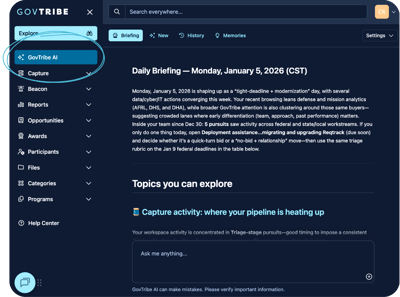
• Quick file access
You can now find files created by GovTribe AI at the top of your conversation when you click Files as well as in your User Files library..png?upscale=true&upscale=true&width=400&height=291&name=Archives%20(18).png)
• Chat personalization
Go to the GovTribe AI tab, click Settings, select Personalization, and scroll to the Verbosity section. There, you can choose if you want chat responses to be High with detailed, report-level analysis, Medium for balanced, practical answers, or Low for short, direct responses..png?upscale=true&upscale=true&width=400&height=292&name=Archives%20(20).png)
• Pursuit assistance
Finally, GovTribe AI can now assist you with specific pursuits. Go to any pursuit and click Let me help. From there, GovTribe AI can help you qualify specific opportunities, identify likely competitors, recommend teaming partners, and even support your proposal strategy..png?upscale=true&upscale=true&width=400&height=220&name=Archives%20(28).png)
2. Interface Update
You might have noticed a fresh new look in GovTribe. We updated the interface and added the ability to choose between light, dark, and system display modes.
To update your theme, click the first dropdown under your profile icon in the top-right corner. From there, you can select Light, Dark, or System to match your device. Once you make a selection, GovTribe will remember your preference for future sessions.-1.png?width=400&height=239&name=Archives%20(2)-1.png)
3. Grant Expert Recommendations
Last quarter, we announced our partnership with OnFrontiers and added contacts for more than 17,000 vetted federal experts across 1,300 agencies to GovTribe. Originally, expert recommendations only appeared on Federal Contract Opportunities, but now you’ll see them on Federal Grant Opportunities as well.
Just scroll to the bottom of any federal grant opportunity and select the kind of support you’re looking for. We’ll recommend experts with relevant experience, and you can connect with them through OnFrontiers for anything from a quick consultation to dedicated advisory support..png?upscale=true&upscale=true&width=400&height=244&name=Archives%20(21).png)
4. Data Expansion
Lastly, we’re constantly expanding our data to help you spot opportunities earlier and shape your pipeline with better insight. This quarter, we enhanced our state and local coverage and added new federal forecast data for the Department of the Treasury, Department of Justice, as well as Health and Human Services.
If you’d like to learn more about our data sources and how often they’re updated, you can find that information anytime in the GovTribe User Guide under our Terms of Use.
Got your own ideas?
Everything we covered is live in GovTribe today and ready for you to explore. As always, we’re building with your feedback in mind—so if there’s something you’d love to see next, we’d love for you to tell us here.
Get started
All of these updates are now live in GovTribe. To try them, simply log in or start a free trial.
Stay in the loop
- Trending Opportunities Newsletter
Get the top 20 trending federal opportunities every month. - GovTribe Blog Newsletter
Be the first to read new blogs packed with useful GovCon help. - Follow Us on LinkedIn
Get our updates and resources right in your feed.
.png?height=200&name=2025%20Q2%20Quarterly%20Roundup%20(24).png)
.png?height=200&name=Blog%20Featured%20Images%20(16).png)